Usability testing, finally in one place.

Usability testing, finally in one place.

Usability testing, finally in one place.

A web platform and Zoom plugin that gives testing moderators everything they need — participant profiles, task cards, issue tagging, notes, and auto-generated reports — without switching between tools.

A web platform and Zoom plugin that gives testing moderators everything they need — participant profiles, task cards, issue tagging, notes, and auto-generated reports — without switching between tools.

Role

UX Researcher & Designer with 3 Designers

Team

Tremoloo

Platforms

Web · Zoom Plugin

Focus

Usability testing platform

Our task was to design Tremoloo in a way that removes the operational burden from usability testing. Moderators were spending more time managing files, platforms, and follow-ups than actually running sessions. We built the tool that should have existed already.

Our task was to design Tremoloo in a way that removes the operational burden from usability testing. Moderators were spending more time managing files, platforms, and follow-ups than actually running sessions. We built the tool that should have existed already.

Challenges

Challenges

Too many tools. Too little time. Too much lost.

Too many tools. Too little time. Too much lost.

Scattered across platforms

Testing moderators were creating documents in one place, running sessions in another, and analyzing results in a third. Every project meant rebuilding the same setup from scratch.

Manual analysis, manual errors

Linking findings across participants and rounds was done by hand. Patterns got missed. Reports took hours. The insight was there — the system to surface it wasn't.

Stakeholders always out of the loop

Sharing updates with the business meant back-and-forth emails and version confusion. The gap between what the team knew and what the client saw was always too wide.

My Role

My Role

My Role

I worked on the UX and design across both the web platform and the Zoom plugin — ensuring the two experiences worked as one coherent system for the moderator running a live session.

01

Web platform
Designed the dashboard, project structure, and document navigation for moderators managing multiple testing rounds

02

Zoom plugin
Designed the in-session experience: participant cards, task navigation, issue tagging, and notes capture — all accessible without leaving Zoom

03

Information architecture
Defined how feature sets, rounds, participants, and tasks relate to each other across the platform

04

Client communication
Presented work and iterated based on feedback throughout
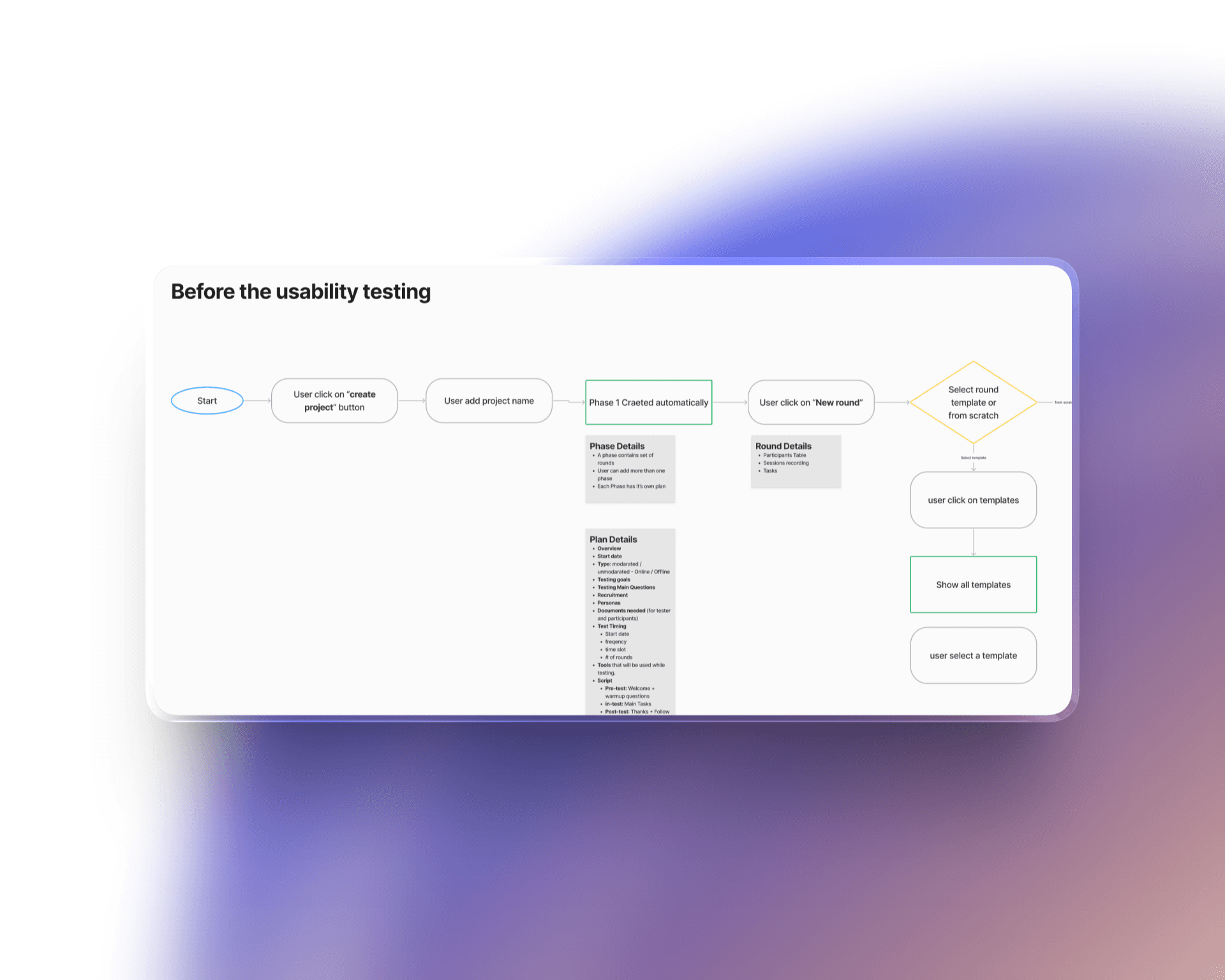
Key Design Decisions

Key Design Decisions

Familiar before functional. Moderators already knew Figma and Notion. The dashboard structure borrowed from tools they used daily — so the learning curve was close to zero. Familiarity wasn't laziness; it was a deliberate way to reduce onboarding friction for a tool people would use under pressure.

Option considered

Build a completely custom navigation model

Decision made

Mirror familiar patterns from tools moderators already use — reduce cognitive load during live sessions

The plugin lives inside the session, not beside it. During a usability test, a moderator can't afford to switch tabs. The Zoom plugin puts the participant profile, current task, issue tags, and notes field all in one panel — visible while the session runs. Everything needed is one glance away.

Task cards that adapt to question type. Not all usability tasks are the same — some are pass/fail, some are open-ended, some require issue tagging. The task card changes its layout based on what the moderator needs to capture, so the right fields are always in the right place without scrolling or hunting.

Option considered

Build a completely custom navigation model

Decision made

Mirror familiar patterns from tools moderators already use — reduce cognitive load during live sessions

Solution

Solution

Solution

One source. Every session.

01

Web dashboard Projects, feature sets, rounds, and participants — all organized in a structure moderators can navigate instantly. No rebuilding from scratch. No file hunting. The project is always where you left it.

02

Zoom plugin The full session experience inside Zoom: participant profile at the top, task card in the middle, issue tags and notes at the bottom. Moderators move through tasks, mark outcomes, tag issues, and capture notes — without ever leaving the call.

03

Adaptive task cards Each task card reflects the question type. Pass, struggled, or failed — one tap. Issue tags pre-populated with the most common usability problems. Notes section always available. The card does the structure so the moderator can focus on the participant.

04

Auto-generated reports When the session ends, the data is already organized. Reports generate automatically from what was captured during the session — no manual synthesis, no copy-pasting between tools, no hours lost to formatting.

Outcome

Outcome

Outcome

Create. Test. Export.
What used to take multiple platforms, manual analysis, and hours of report writing became a single workflow — from participant setup to exported insights. Moderators run better sessions because the tool handles the overhead. Stakeholders stay informed because the data is always current.

Challenges

Too many tools. Too little time. Too much lost.

Scattered across platforms

Testing moderators were creating documents in one place, running sessions in another, and analyzing results in a third. Every project meant rebuilding the same setup from scratch.

Manual analysis, manual errors

Linking findings across participants and rounds was done by hand. Patterns got missed. Reports took hours. The insight was there — the system to surface it wasn't.

Stakeholders always out of the loop

Sharing updates with the business meant back-and-forth emails and version confusion. The gap between what the team knew and what the client saw was always too wide.

Let's build exceptional designs together

© All rights reserved 2026.

Let's build exceptional designs together

© All rights reserved 2026.

Let's build exceptional designs together

© All rights reserved 2026.

Create a free website with Framer, the website builder loved by startups, designers and agencies.