Studio-quality content. No studio needed.

Studio-quality content. No studio needed.

Studio-quality content. No studio needed.

An AI-powered product content generator — paste a link, get professional photos, videos, and reels. No model, no photographer, no production cost.

An AI-powered product content generator — paste a link, get professional photos, videos, and reels. No model, no photographer, no production cost.

Role

UX Lead + UI Designer

Team

Tremoloo

Platforms

iPad App

Focus

AI content generation

Our task was to design ProductProva.ai in a way that makes professional product content feel effortless. The entire value proposition had to be felt in the first interaction — paste a link, watch it work, get your content. Minimum clicks, maximum output.

Our task was to design ProductProva.ai in a way that makes professional product content feel effortless. The entire value proposition had to be felt in the first interaction — paste a link, watch it work, get your content. Minimum clicks, maximum output.

Challenges

Challenges

Studio output. Zero studio friction.

Studio output. Zero studio friction.

One input. Everything generated.

The product had to extract brand colors, logo, product type, and visual style — all from a single link — then generate professional content automatically. The UX had to make this feel instant, not complex.

Fewest clicks possible

Every extra step between "paste link" and "get content" is friction. The design had to eliminate unnecessary decisions and surface the right options at the right moment — not all at once.

Transparency during generation

AI generation takes seconds. Those seconds needed to feel purposeful — showing the user what the system was doing, building confidence rather than anxiety while they wait.

My Role

My Role

My Role

I led the UX and UI across the full product alongside one designer — owning the full flow from link input to content output.

01

Core flow
Designed the end-to-end experience: link input, generation states, output display, variant selection, and iteration

02

Generation transparency
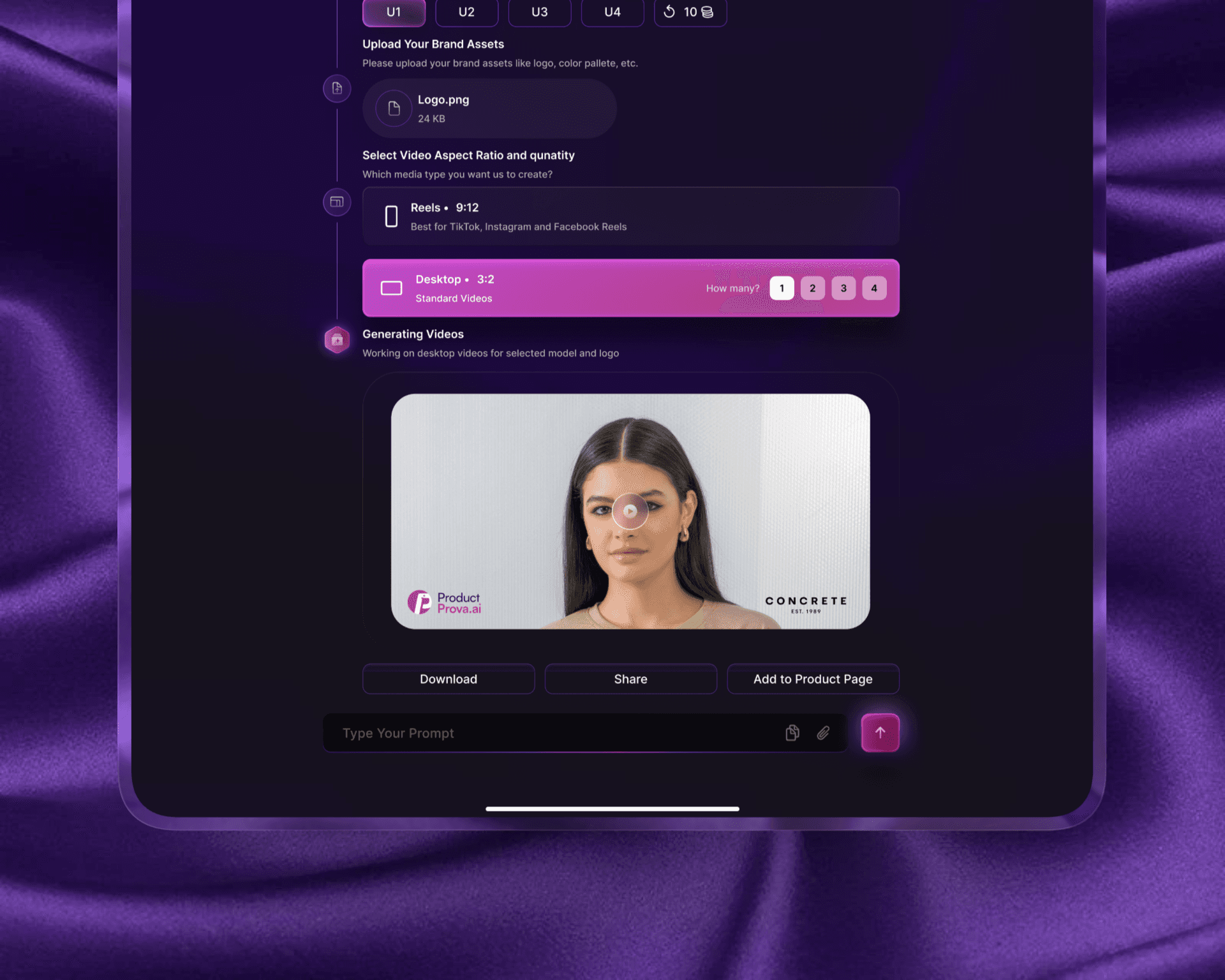
Designed the thinking/processing states that show the user what's happening step by step — link processing, product detection, brand asset extraction, model selection, video generation

03

Output & variants
Designed the content output view with download, share, and regenerate actions, plus variant selection for different product colors

04

Minimum clicks principle
Every design decision was evaluated against one question: can we remove a step without losing clarity?

Key Design Decisions

Key Design Decisions

One input. That's the whole onboarding. The home screen is a single text field with one action. No setup, no configuration, no choices before the user has seen any value. The product earns trust by working first — options come after.

Option considered

Multi-step setup flow before generation

Decision made

Single input → generate → output — configuration only after the user has seen results

Make the AI's thinking visible. During generation, the app shows a step-by-step breakdown: link processing → product detected → brand assets extracted → model selected → video generating. This wasn't decoration — it built confidence that something real was happening, and made the wait feel like progress.

Variants without interruption. After the output is generated, color variants appear as swatchable options at the bottom — not in a separate screen, not before generation. The user sees their result first, then can explore alternatives without losing the primary output.

Option considered

Multi-step setup flow before generation

Decision made

Single input → generate → output — configuration only after the user has seen results

Solution

Solution

Solution

Paste. Generate. Done.

01

Single-input home One field. One button. The entire product promise is in that interaction. No account required to see the first result — the output is the hook.

02

Transparent generation A step-by-step thinking flow that shows exactly what the AI is doing — extracting brand identity, detecting the product, choosing the right model, generating the video. The wait becomes part of the experience.

03

Output with actions The generated content appears with download, share, and regenerate options immediately accessible. No navigating away, no saving to a separate library first.

04

Variant selection Product color variants appear as swatches below the output. One tap regenerates for the selected variant. More output, fewer clicks.
Outcome

Outcome

Outcome

From product link to professional content in seconds.
A tool that replaces an entire production pipeline — model, photographer, studio, editor — with a single link and a few seconds of generation time. Designed for minimum friction from first tap to final asset.

Challenges

Studio output. Zero studio friction.

One input. Everything generated.

The product had to extract brand colors, logo, product type, and visual style — all from a single link — then generate professional content automatically. The UX had to make this feel instant, not complex.

Fewest clicks possible

Every extra step between "paste link" and "get content" is friction. The design had to eliminate unnecessary decisions and surface the right options at the right moment — not all at once.

Transparency during generation

AI generation takes seconds. Those seconds needed to feel purposeful — showing the user what the system was doing, building confidence rather than anxiety while they wait.

Let's build exceptional designs together

© All rights reserved 2026.

Let's build exceptional designs together

© All rights reserved 2026.

Let's build exceptional designs together

© All rights reserved 2026.

Create a free website with Framer, the website builder loved by startups, designers and agencies.